



The Hunger Bar Cafe
Manage billing, table orders, kitchen workflow, inventory, and customer loyalty from one hospitality-ready platform.
Designed for cafe and food-service businesses that need fast billing, operational control, and better guest experience.
Cafe POS • Kitchen Workflow • Inventory • Service Quality
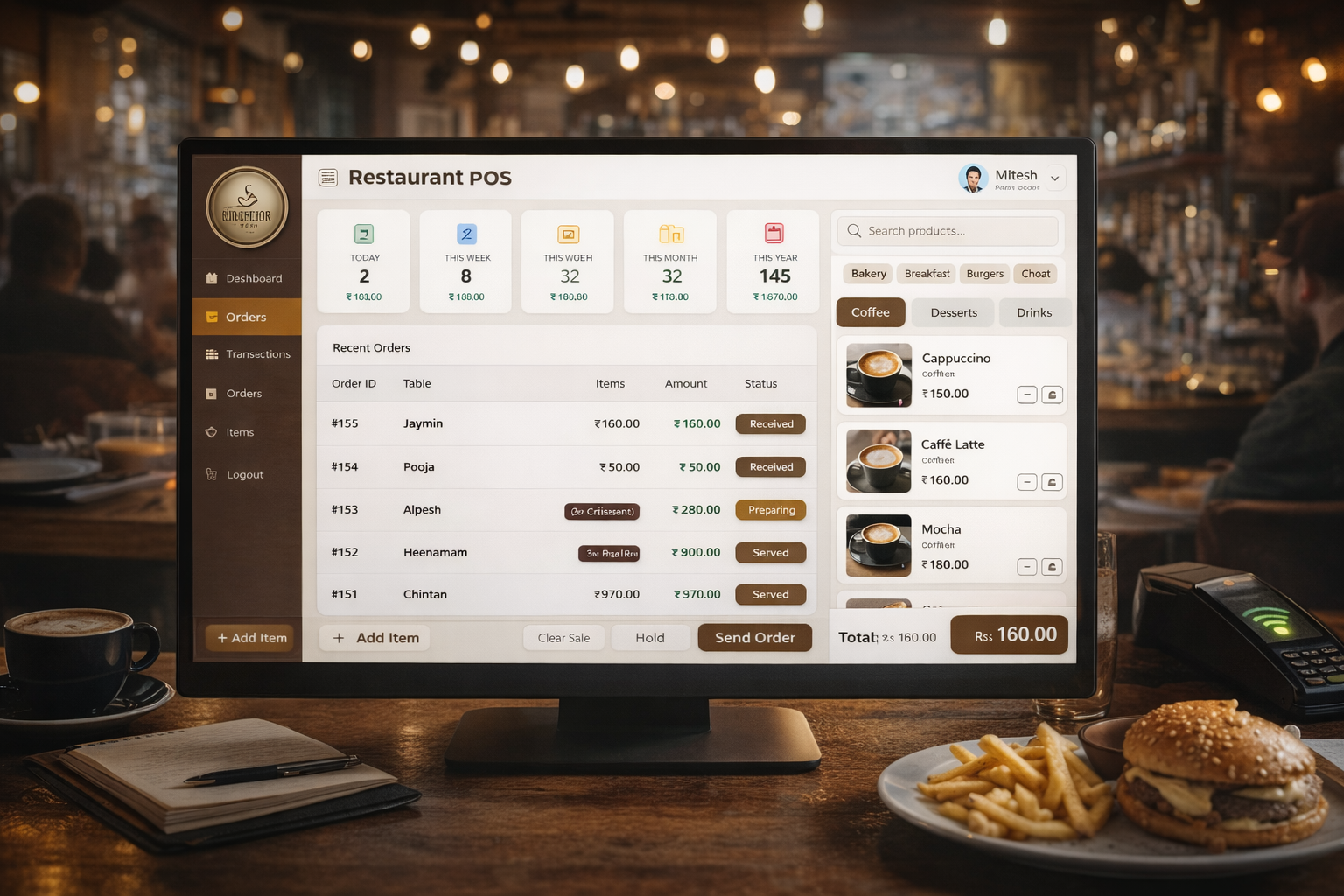
Preview POS billing, KOT, and kitchen flow in a guided demo.
Problem
Cafe teams often use disconnected tools for billing, inventory, and kitchen execution, which slows service and increases leakage.
Without a connected cafe system, staff face order delays, stock mismatches, and poor visibility into peak-hour performance.
 Billing and table operations are slower during rush hours
- Kitchen tickets and order coordination are inconsistent
- Ingredient-level inventory is difficult to control
- Managers lack real-time sales and outlet visibility
Solution
The Hunger Bar Cafe platform unifies POS, KOT, inventory, and reporting in one streamlined workflow.
It helps teams serve faster, reduce wastage, and maintain service consistency across counters and outlets.
- Fast POS billing with tax and discount controls
- Table, takeaway, and delivery order handling
- Kitchen ticketing and prep-status visibility
- Inventory and consumption-linked stock tracking
Best Fit Sectors
Who Should Choose This Product
- Operations-focused teams needing process control
- Leaders seeking reliable performance visibility
Expected Measurable Outcomes
Typical target outcomes after clean process implementation and team adoption:
- Target faster operational visibility and process response time
Choose How You Want to Start
Start Fast – SaaS
Monthly pricing, standard modules, cloud hosting, and quick onboarding.
Book Free ERP ConsultationBuild Custom – Enterprise
Custom workflows, integration support, dedicated deployment, and team training.
Talk to ERP ExpertBuilt by Experienced ERP Developers
AivoraNextgen is an Ahmedabad-based startup ERP company with a hybrid SaaS + enterprise model. Founder and solution experts stay directly involved in process design, implementation planning, and critical rollout decisions.
- Made in India ERP (Ahmedabad-based team)
- Global deployment-ready architecture
- Implementation + customization + ongoing support
- Founder-led product and solution guidance
Operational Impact
This solution is designed to connect day-to-day execution with management-level visibility. Teams no longer work in disconnected tools for approvals, updates, and tracking. Instead, activities are captured in one operating flow with clear role ownership and audit-ready traceability.
As adoption matures, leadership gains faster insight into performance, bottlenecks, and process adherence. This supports quicker decisions, predictable operations, and better coordination between departments without adding manual reporting burden.
Features
- Point-of-sale and role-based cashier controls
- Menu, combo, and modifier configuration
- Kitchen order ticket and queue workflow
- Ingredient and stock-level monitoring
- Daily settlement and shift reconciliation
- Outlet-wise reports and top-item analytics
Use Cases
Single Outlet Cafes
Improve billing speed and service consistency during peak hours.
Multi-Outlet Food Brands
Standardize kitchen and inventory controls across locations.
Takeaway + Delivery Models
Coordinate channels with unified order and prep workflows.
Hospitality Managers
Track outlet performance and reduce stock leakages quickly.
Demo Video
Product Image Gallery
Who This Is For
For Founders & CEOs
Get visibility into performance, operations, and growth metrics from one control panel.
For Operations Teams
Automate repetitive workflows, approvals, and task coordination across departments.
For Managers & Executives
Track team KPIs, turnaround time, and compliance with role-wise dashboards.
Implementation Timeline
Business Analysis
Current process review, objectives, and expected outcomes definition.
Workflow Mapping
Department workflows and approval paths mapped with role ownership.
ERP Configuration
Modules, permissions, and controls configured for your operations.
Data Migration
Structured migration of key masters and transactional data.
Training
Role-based onboarding for teams and decision-makers.
Go Live Support
Launch monitoring and rapid issue handling for smooth transition.
Continuous Optimization
Process refinement and module expansion as business grows.
Before & After Outcomes
Before
Manual follow-ups, fragmented approvals, delayed reporting, and reactive operations.
After
Automated workflows, centralized dashboards, clear ownership, and faster decision-making.
Business Outcomes
Faster Service
Reduce order-to-serve time during peak traffic.
Lower Wastage
Track consumption and inventory in near real-time.
Better Guest Experience
Deliver consistent order handling across channels.
Outlet Visibility
Monitor sales and operations from centralized dashboards.
Case Studies
Urban Cafe Chain
Digitized POS and kitchen operations.
22% faster order turnaroundQuick Service Outlet
Connected menu, billing, and inventory flow.
18% reduction in stock varianceClient Testimonials
“Order handling became smoother and turnaround time improved at busy counters.”
Owner, Urban Cafe Chain
“Kitchen coordination and settlement workflows became much more reliable.”
Operations Manager, QSR Brand
Why Choose AivoraNextgen Over Large ERP Vendors
- Faster implementation cycles than large ERP vendors
- Affordable customization aligned to business reality
- Direct expert communication without long escalation chains
- Flexible workflows that adapt as teams scale
- Personal support during rollout and post go-live
We don’t just sell ERP software — we build systems that evolve with your business.
Consultation & Pricing
Flexible pricing based on modules, users, customization, and deployment type.
- Modules
- Users
- Customization
- Deployment Type
Share your process and goals with us. We will map the right rollout plan, timeline, and pricing for your use case.
Frequently Asked Questions
How quickly can we go live?
Most implementations begin with a guided setup and can go live in a few weeks depending on process complexity and data readiness.
Can this integrate with our existing tools?
Yes. We support practical integration workflows and can map key data exchange points during consultation.
Do you provide training and support?
Yes. We provide role-based onboarding, documentation, and post-launch support.
Is pricing fixed or based on scope?
Pricing is scope-based and depends on modules, user count, integrations, and rollout requirements.